Platform

See how iWeave keeps your day connected from setup to billing.

Most teams still rely on spreadsheets, forms, roster tools, and finance follow-up that do not stay in sync. iWeave brings team setup, participant records, funding, rosters, mobile delivery, timesheets, billing, claims, incidents, and compliance into one structured platform.

iWeave Cloud One operating record from setup to follow-up
  1. Records Staff, participants, funding
  2. Roster Shifts and service details
  3. Delivery Mobile work capture
  4. Billing Invoices and claims
  5. Oversight History and follow-up
Setup Scheduling Field work Finance
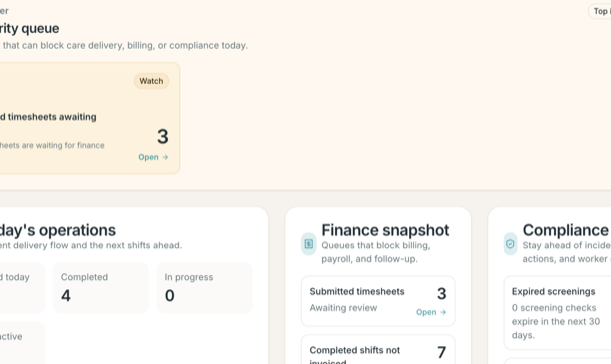
Product interface fragments shown with demonstration data.

Set up people, participants, and funding faster

Keep the records your team needs together before the first shift goes out.

Keep roster changes, field work, and timesheets aligned

Move from scheduling to mobile delivery without losing context between office and field.

Move approved work into invoices and claims sooner

Keep finance, utilisation, and follow-up closer to the work that created them.

Why teams switch

Replace the patchwork with one operating system for care.

iWeave brings together the work that usually gets split across admin files, roster tools, mobile notes, approvals, and finance follow-up. That means less re-entry, fewer manual handoffs, and a clearer path from setup to delivered work to billing.

  • Team setup, qualifications, and screening expiry tracking
  • Participant records, contacts, service locations, and notes
  • Services, agreements, budgets, and clearer funding visibility
  • Roster planning, mobile check-in and check-out, and shift notes
  • Timesheets, invoice generation, claims, and compliance follow-up
What You Can Manage

The core operating pillars behind the platform.

iWeave is built around the real flow of care work: set up the team, keep participant and funding context together, run service delivery, then move approved work into billing, claims, and oversight.

People

Start from records your team can trust

Keep company setup, user access, staff profiles, qualifications, pay inputs, and screening dates together instead of rebuilding them across separate admin tools.

  • Company profile, registrations, and company settings
  • Invites for admin, coordinator, scheduler, finance, and compliance roles
  • Staff profiles, qualifications, and worker screening expiry visibility
Funding

Keep participant and funding context together

Bring participant details, contacts, locations, notes, NDIS or aged care details, service agreements, and budgets into one organised view.

  • Participant profiles, contacts, addresses, and notes
  • NDIS and aged care details where your team needs them
  • Services, agreements, and budget summaries side by side
Delivery

Run service delivery without losing context

Plan shifts, assign staff, keep the mobile team aligned, and capture what happened in the field without breaking the thread between office and frontline work.

  • Roster planning, conflict detection, and shift status tracking
  • Mobile my-shifts view, check-in and check-out, and field notes
  • Real-time visibility into active and completed work
Control

Move cleanly from approved work to finance and follow-up

Turn completed shifts and approved timesheets into invoices, claims, payroll exports, funding visibility, and compliance follow-up without stitching together the story later.

  • Timesheet submission, review, rejection, and resubmission
  • Invoice generation, claims, and payroll exports
  • Funding utilisation, incidents, and compliance action tracking
How Work Moves

Follow the path from setup to delivery to finance.

Open each stage to see what iWeave supports and what gets easier next when the team is working from one connected platform.

Setup

Bring people, participants, and funding into one starting point.

Set up the organisation, invite the team, keep staff records and screening dates visible, then build participant records, agreements, and budgets from the same system.

  • Company profile, registrations, and user invitations
  • Staff profiles, qualifications, screening checks, and payroll details
  • Participant contacts, service locations, notes, and NDIS or aged care details
  • Services, agreements, and budget allocation, with a guided category-led setup wizard for building your service list
What improves first

Your team starts from the same information instead of re-entering it across files, forms, and disconnected admin tools.

Team

Team setup with the right access

Invite admins, coordinators, schedulers, finance, compliance, and staff with clearer role boundaries from day one.

Funding

Participant agreements and budgets in context

Connect participants, agreed services, and budget summaries before work is scheduled.

Rostering

Build rosters with better visibility and fewer surprises.

Plan shifts against people, participants, service types, and locations while keeping the team aligned on what changed and what needs attention next.

  • Shift creation with participant, staff, service, time, and location
  • Recurring schedule patterns that generate shifts from agreements
  • Conflict detection and shift lifecycle tracking
  • Staff roster view in the mobile app
  • Validation against active agreements and allowed services
What improves first

Scheduling changes stop breaking context because office and field teams are working from the same shift information.

Roster

Plan shifts with clearer operational control

Build rosters with staff-to-participant allocation, schedule visibility, and change tracking in a single view.

Mobile

Keep the team aligned before the shift starts

Give staff a clearer upcoming-shifts view so the team sees the same service details across office and field workflows.
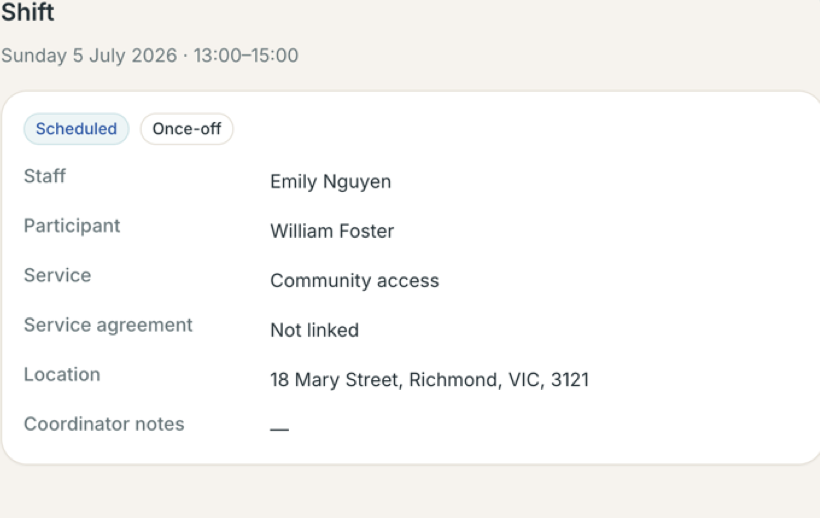
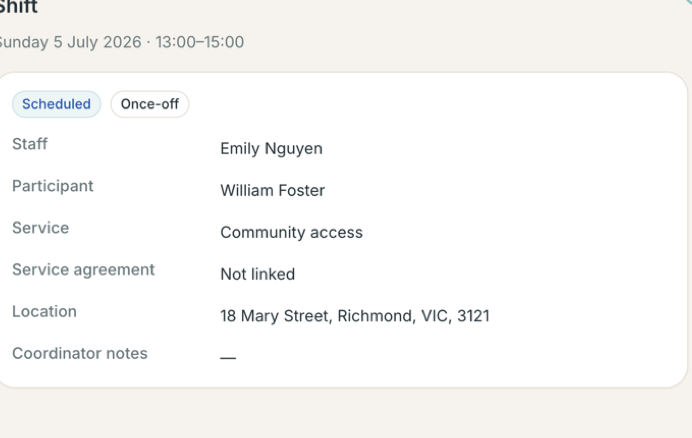
The iWeave Cloud shift detail panel showing staff, participant, service, location, and schedule information
The shift detail panel in the Company Portal — staff, participant, service, location, and schedule information together. Demonstration data.
Delivery

Capture what happened while work is happening.

Staff can log in securely on mobile, see their shifts, check in and out with timestamps and location, add notes, and complete work without waiting for end-of-week reconstruction.

  • Secure staff mobile login with the right shift access
  • Check-in and check-out with geolocation and address capture
  • Travel kilometres and expense claims, with photo evidence, captured at checkout
  • Shift notes, observations, and completion recording
  • Active shift visibility for coordinators and reviewers
What improves first

You get a stronger record of delivered work before timesheets, billing, and follow-up even begin.

Field

Mobile shift execution your team can use daily

Support staff with a cleaner check-in, note capture, and completion flow while services are being delivered.

Hours

Timesheet handoff with less follow-up

Completed work flows into timesheet review, approval, rejection, and correction instead of being rebuilt from memory.
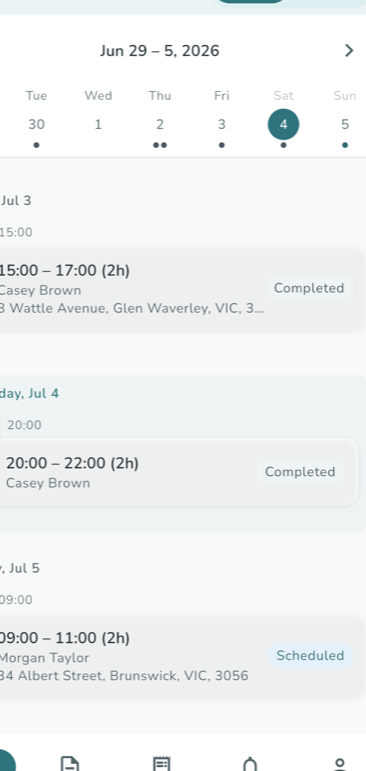
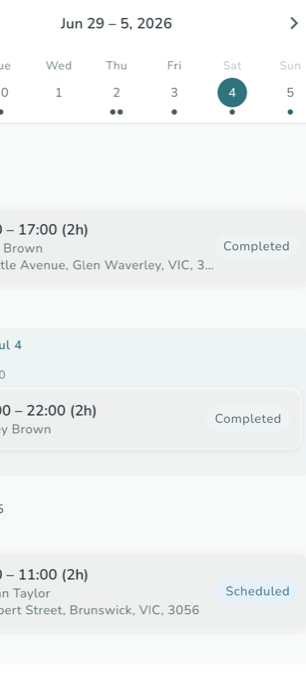
The iWeave Staff mobile app week view listing completed and scheduled shifts with participant names and service addresses
The staff app week view — completed and upcoming shifts with locations. Demonstration data.
Finance & oversight

Move approved work into billing, claims, and follow-up faster.

Turn completed shifts and approved timesheets into invoices, claims prepared the way your funding program requires, payroll exports, clearer funding visibility, and clearer follow-up on incidents or compliance actions.

  • Timesheet review, approval, rejection, and correction workflow
  • Invoice generation from completed shifts, with pay exports driven by approved timesheets
  • Claims prepared for the program you use and payroll exports
  • Incident reporting, compliance actions, and screening expiry visibility
What improves first

Finance and compliance stop waiting on scattered updates because the next action is easier to see and act on.

Claims

Billing and claims built around approved work

Generate invoices, prepare claims in the right format, and keep funding visibility closer to the services that created it.

Review

Oversight and compliance with clearer follow-up

Keep incident reviews, compliance actions, and screening expiry follow-up visible without adding more admin complexity.
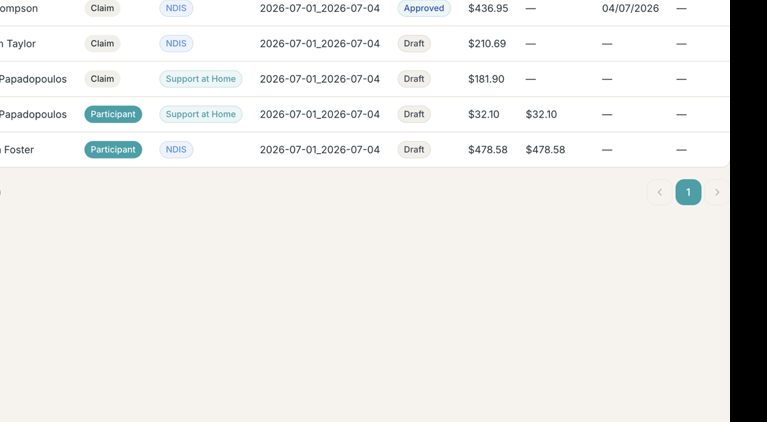
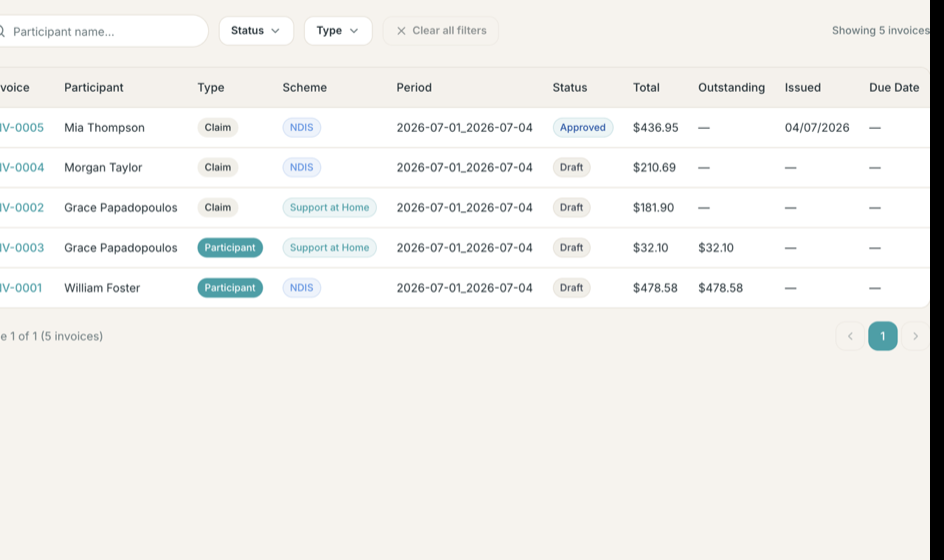
The iWeave Cloud invoices screen listing claim and participant invoices across NDIS and Support at Home schemes with draft and approved statuses
Invoices in the Company Portal — claim and participant invoices across NDIS and Support at Home. Demonstration data.
Scheme view

One finance workflow, multiple funding programs

NDIS Support at Home
Work across NDIS and aged care

Keep one operating core even when you work across NDIS and aged care.

iWeave is designed so one team can keep agreements, budgets, service rules, and finance outputs aligned without splitting daily operations across separate systems.

  • One team and one system for daily operations
  • Agreements, pricing, and claims prepared for NDIS or aged care requirements
  • NDIS and aged care details available where the team needs them
  • Room to grow without re-platforming later

Working across more than one funding program is available on the Grow plan.

Trust And Control

The details teams look for when software becomes part of daily operations.

Sensitive information, staff access, delivery history, screening dates, and incident follow-up all need to stay manageable without dragging the team into heavier software than they need.

Illustration of secure access and system trust across company and mobile workflows
Built for day-to-day trust

Keep access, history, and follow-up easier to manage as the team grows.

iWeave is built to help you control who sees what, keep a clearer record of what happened, and manage sensitive day-to-day work without layering on enterprise complexity.

  • Give the right people the right access across office and field teams
  • Keep each business's information separate with a clearer history of what happened
  • Keep shift, timesheet, incident, and compliance follow-up visible
  • Let office and field teams work from the same rules and records

Right people, right access

Separate company roles and staff access so your team sees what they need without sharing everything with everyone.

Clear history when reviews happen

Shift events, notes, approvals, incidents, and follow-up actions are easier to review when you need to check what happened.

Grow without layering new admin tools

As your team and service mix grow, you can keep one platform for operations instead of stacking new systems on top.

See how your team would use iWeave in practice.

We’ll walk through setup, rostering, mobile delivery, timesheets, billing, and follow-up so you can see where time gets saved first.